
Referral marketing
Know exactly which guests and how much revenue each referrer brings in
Don't just track clicks. Track the guests and revenue generated by every referral.
- •Solvit Loyalty's referral program is available on the Pro and Enterprise plans and is not included on Basic.
- •Every referrer gets a personal link and QR code to bring in new guests.
- •A guest who signs up through a referrer's link is permanently attributed to them via a referrer_id field.
- •For each referrer, the business sees guest count, purchase count, total revenue, and average check.
- •A referrer can be deactivated but not deleted once they've brought in guests, preserving historical data.
- •The dashboard separately shows the share of guests who arrived via referrer links among all guest sources.
What's wrong with a plain referral link
A link shows clicks, not guests
A typical referral or affiliate link counts clicks, but doesn't tell you who actually became a guest, how often they came back, or how much they spent.
It's unclear which influencer or partner is actually working
Without attributing guests to their source, a business owner judges marketing performance by gut feeling instead of the revenue a specific person or channel actually generated.
A one-off promotion never becomes a real channel
Even if an influencer brings in customers once, without tracking their later visits the business can't tell whether it's worth continuing the partnership or which partners to prioritize.
How Solvit Loyalty solves this
Every referrer gets a personal link and QR code, every guest gets a permanent attribution to their source.
A personal link and QR code for every referrer
An influencer, brand ambassador, partner business, or staff member gets their own named link and QR code to invite guests.
Permanent guest-to-referrer attribution
The moment a guest signs up through the link, they're permanently attributed to that referrer in the system — even if they come back months later.
Revenue, not just clicks
The platform tracks guest count, purchase count, revenue, and average check per referrer — not just how many times the link was opened.
Flexible referrer management
A referrer can be deactivated once a partnership ends, but never deleted after they've brought in guests — their history and stats stay intact.
Typical scenarios
Who becomes a referrer for a business
An influencer brings in followers through their link
A local influencer posts their personal link or QR code in a story, and every guest who signs up through it is permanently attributed to them.
A partner business nearby recommends you
A neighboring hotel, gym, or shop shares a QR code with its own customers, and you see exactly how much revenue that partnership generated.
A staff member brings in guests personally
A waiter or manager gets their own link and is motivated to bring in new guests, with results visible in a separate stat line.
A brand ambassador works on an ongoing basis
An ambassador gets a long-running personal link, and the business sees not a one-time spike but a steady stream of guests and revenue from that channel.
Features that matter for referral marketing
Everything needed to run and track a referrer program
Personal links and QR codes
Every referrer gets a unique link and QR code that can be printed, posted on social media, or shown at a partner's checkout.
Permanent guest attribution
The `referrer_id` link to a guest stays in place permanently, even months after their first visit through the link.
Per-referrer statistics
Guest count, purchase count, total revenue, average check, and active status — all in one table.
Guest source breakdown on the dashboard
A separate metric shows how many guests arrived via a referrer's link versus self-registered or were added by staff.
Deactivation without losing history
A referrer can be turned off at any time, stopping new signups through their link, while all accumulated stats stay intact.
Available on Pro and Enterprise
The referral program is included on the Pro and Enterprise plans alongside segments, campaigns, and push notifications.
What it looks like in the panel
Real screens from the Solvit Loyalty admin panel
The referrers page shows guest count, total revenue, and average check for every source — making it easy to see who's actually bringing in paying guests.
Learn more about guest management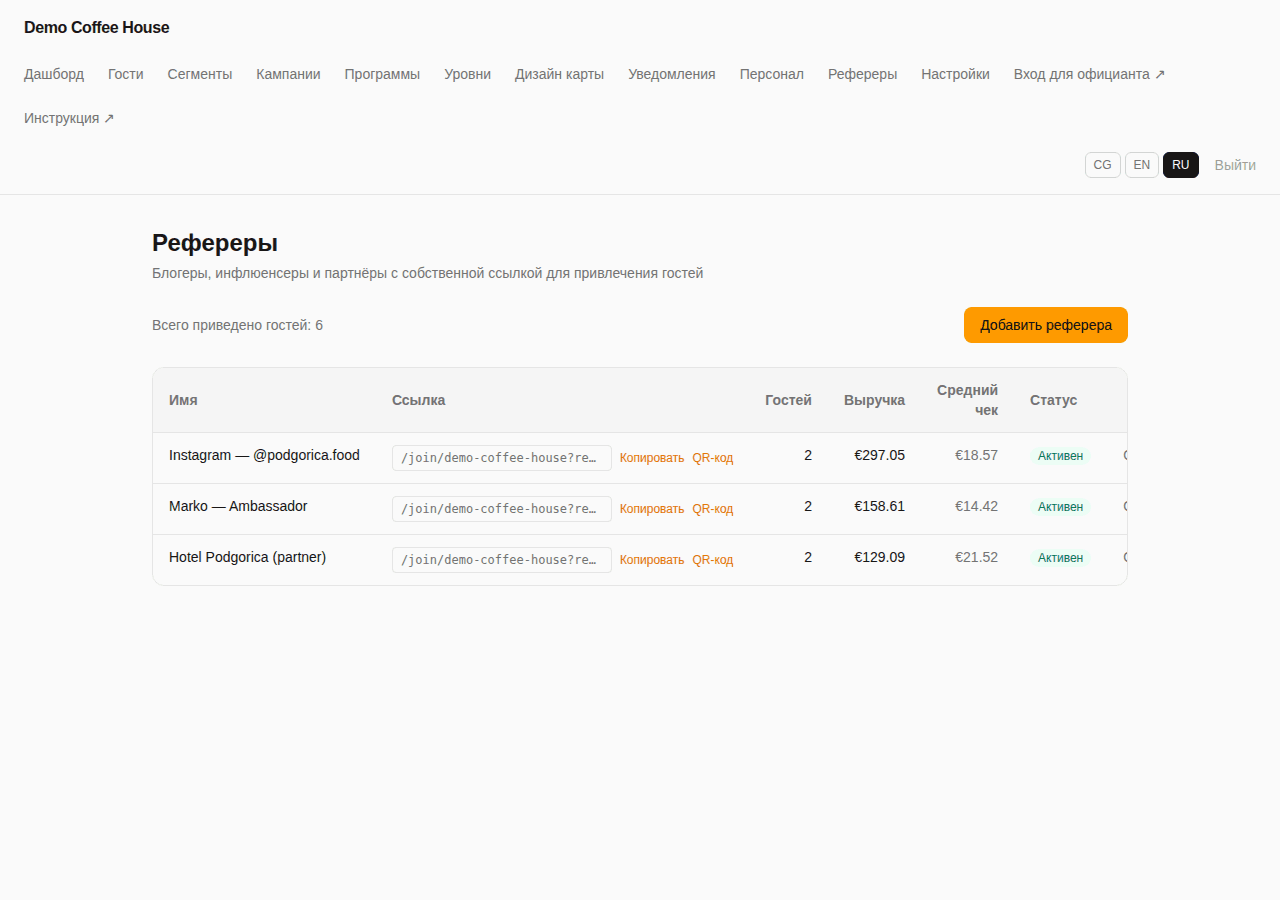
The dashboard separately shows how many guests arrived via a referrer's link versus self-registering or being added by staff.
Learn more about the dashboard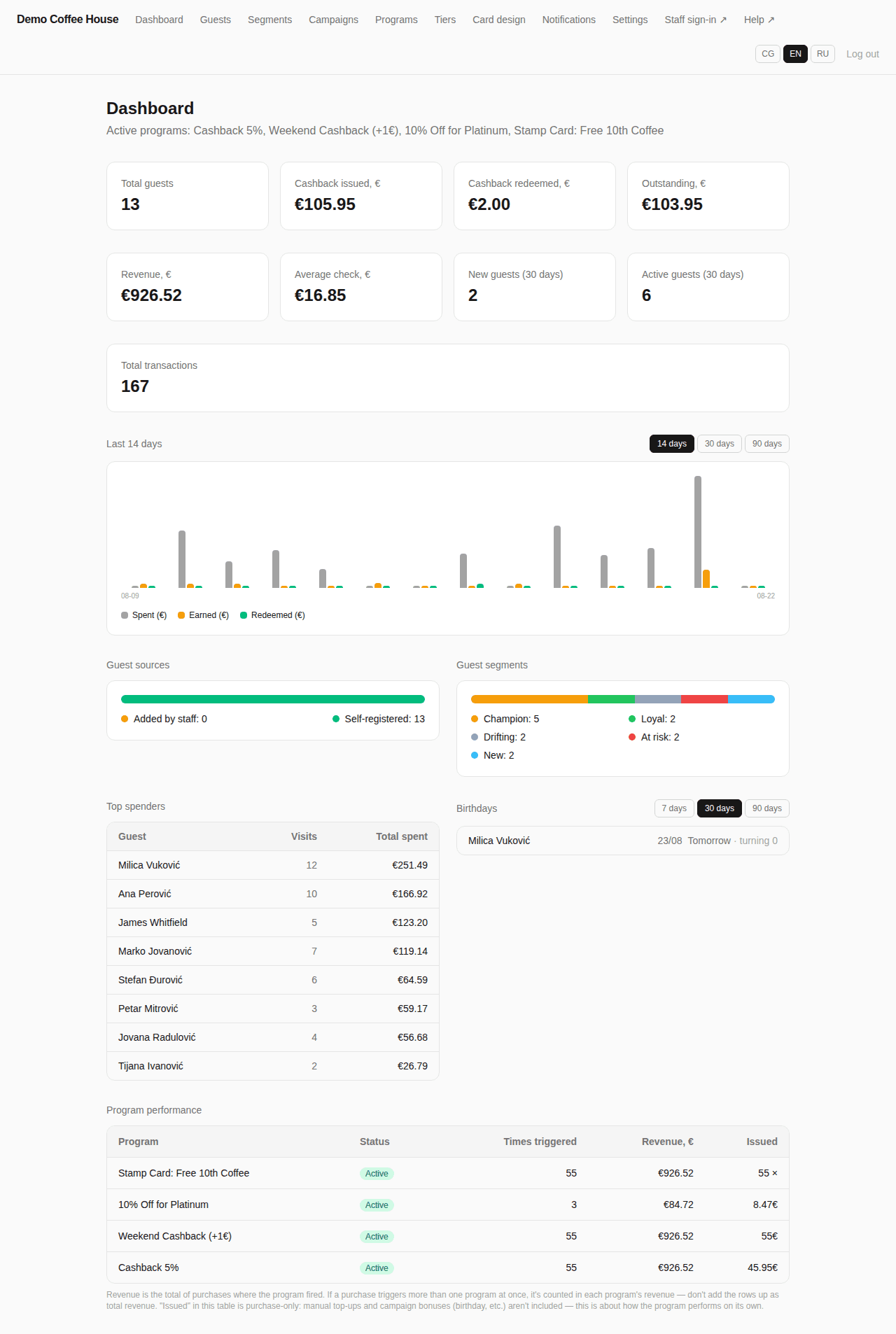
A guest who arrived through a referral looks exactly like any other guest — same balance, purchase history, and QR card.
Learn more about guest profiles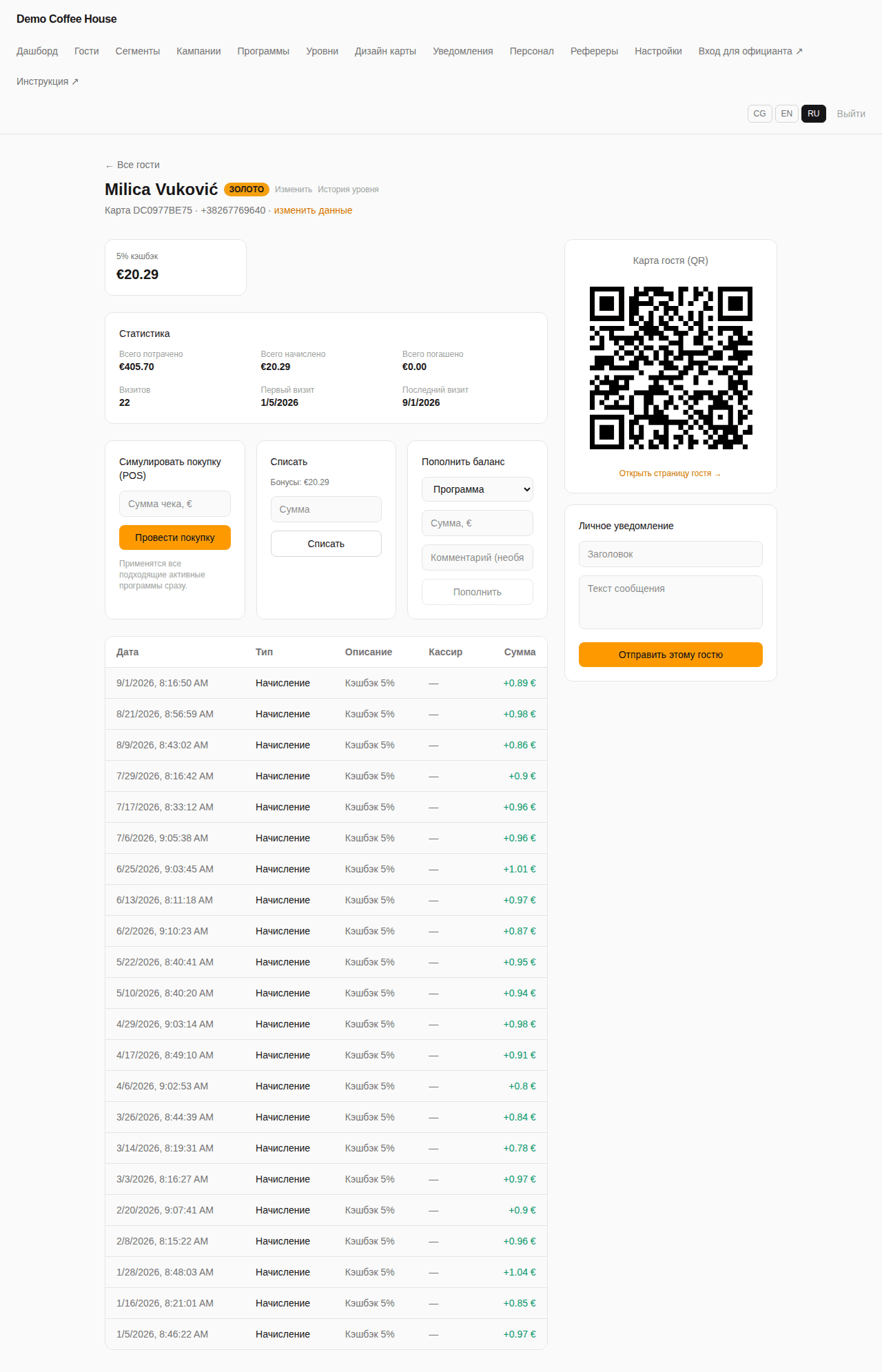
Practical workflow
From creating a referrer to their first attributed revenue
- 1
Create a referrer
In the panel, add a new referrer — an influencer, ambassador, partner, or staff member — and the system generates a personal link and QR code for them.
- 2
The referrer shares their link
The referrer posts the link on social media, prints the QR code, or shows it at a partner business's checkout.
- 3
A guest signs up and is permanently attributed
After following the link and getting a loyalty card, the guest is attributed to that referrer in the system with no time limit.
- 4
You review the stats per referrer
The referrers page shows guest count, revenue, and average check for every source, making it clear which partnerships to continue.
Analytics and results
For every referrer, you see more than a one-time spike in clicks — you see their real contribution to the business, in guests who keep coming back and the revenue they generate.
- Guest count brought in by each referrer
- Total revenue and average check for each referrer's guests
- Referrer active/inactive status at a glance
- Share of guests arriving via referral links in the overall source breakdown
- History: a referrer keeps their stats even after being deactivated
Not just clicks — guests and revenue
Solvit Loyalty's referral program doesn't stop at counting clicks. Every guest who signs up through a personal link is permanently attributed to their referrer, and the business sees the real visits, purchases, and revenue that source generates — not a one-time spike in traffic.
- A personal link and QR code for influencers, ambassadors, partners, and staff
- Permanent guest-to-referrer attribution via the `referrer_id` field
- Guest count, revenue, and average check for every source
- Available on the Pro and Enterprise plans
Frequently asked questions
How is a referrer's personal link created?+
In the admin panel, you add a new referrer — an influencer, ambassador, partner business, or staff member — and the system automatically generates a named link and QR code for them.
What happens when a guest signs up through a referrer's link?+
The guest is permanently attributed to that referrer via the referrer_id field on their record — the attribution stays no matter how much time passes before their next visit.
What stats does a business see for each referrer?+
The referrers page shows guest count, purchase count, total revenue, and average check for each source.
Which plans include the referral program?+
Referrers are available on the Pro and Enterprise plans; the feature isn't included on Basic.
Can a referrer be deleted?+
A referrer can be deactivated at any time, which stops new signups through their link, but can't be deleted entirely once they've brought in guests — that preserves the historical data.
How is this different from a plain affiliate link that just counts clicks?+
A typical affiliate link counts clicks, while Solvit Loyalty tracks the actual guest record — their visits, purchases, and revenue — not just the fact that the link was clicked.
Can we see how many guests came via referrals versus signed up on their own?+
Yes, the dashboard separately shows the guest source breakdown: added by staff, self-registered, and via referrer link.
Who can be a referrer?+
Anyone with an audience or a relationship with potential guests — an influencer, a brand ambassador, a partner business, or your own staff member.
Ready to track the real revenue behind your referrals?
Request a demo and we'll show you how to set up a referral program for your business on the Pro or Enterprise plan.