
For restaurants and cafés
A loyalty program that brings guests back to your restaurant
Guests scan a QR code and get a digital loyalty card on their phone — no plastic, no app to download. Cashback, discounts and tiers apply automatically at checkout, while you see in the dashboard who's a regular and who hasn't shown up in a while.
- •Solvit Loyalty is a digital loyalty platform for restaurants and cafés with no plastic cards and no native app.
- •Guests receive their loyalty card as a QR code and install it to their phone's home screen.
- •The platform supports four loyalty program types: percentage cashback, fixed-amount cashback, percentage discount, and a stamp card.
- •Guests are automatically placed into one of five RFM segments: New, Champion, Loyal, Drifting, and At risk.
- •The cashier module signs in with a PIN only, with no email required, and scans guest cards with the camera.
- •The referral program is available on the Pro and Enterprise plans and tracks guests, visits, and revenue generated through each referrer's personal link.
What a restaurant loses without guest tracking
A guest visits once and disappears
Without a name, phone number, or visit history, there's no way to reach out — the guest simply picks somewhere else next time, and you never even find out they left.
"Regulars" discounts depend on the cashier's memory
Without a system, a discount for a familiar face depends on the cashier's mood and memory — there are no consistent rules, and nobody has time to track it in a notebook or spreadsheet during a busy shift.
Guests drift away without a single signal
A restaurant usually finds out a regular has stopped coming by accident, months later — by then there's no one to remind, no bonus to offer, and no message to send.
How Solvit Loyalty solves this for restaurants
Set it up once — the system handles the bonus math, guest tiers, and win-back reminders on its own.
A digital card instead of plastic
Guests get a QR card on their phone and add it to the home screen in one tap — no app, no plastic card to print or lose.
Cashback, discounts and stamps — in any combination
Percentage cashback, fixed-amount cashback, percentage discounts, and a stamp card for repeat visits — run several at once, each limited by day, time, purchase amount, or first visit only.
Tiers push up the average check
Guests move up automatically based on lifetime spend — their tier badge shows on the card and can unlock better terms on discount programs.
Bringing guests back without manual work
The moment a guest slips from active to drifting, the system sends a win-back push on its own — no daily monitoring needed from staff.
Typical scenarios
How restaurants use Solvit Loyalty day to day
A new guest gets a card at the table
A waiter or cashier registers the guest by phone number, the guest scans the QR code and saves the card to their phone — ready to use on the very first payment.
A regular collects stamps toward a coffee
Every purchase earns a stamp, and once enough are collected, the cashier redeems the reward with one tap at checkout.
A guest gets a birthday bonus
A few days before their birthday, a guest automatically receives a push with a bonus that expires if it isn't used.
A guest who's been away gets a reminder
As soon as a guest slips into the drifting segment, they automatically get a push inviting them back — with no admin involved.
Features that matter for a restaurant
Everything you need to manage repeat guests, in one panel
Cashier module
PIN-only sign-in with no email, a camera QR scanner with a manual card-number fallback — the cashier just taps Charge or Redeem and the matching programs apply automatically.
Guest tiers
Automatic tiers by lifetime spend, with a manual override for VIP guests — every change is logged in the tier history.
RFM segments
Every guest is automatically placed into a segment — New, Champion, Loyal, Drifting, At risk — recalculated in real time.
Automated campaigns
Birthday bonuses, win-back offers for drifting guests, and bonus-expiration reminders run without staff involvement, each with its own run history.
Push notifications
Broadcast to every guest who opted in and installed the card to their home screen, with a delivery log showing reach for every message.
Guests page and Excel export
A filterable guest list by segment, tier, spend, and visit date, with export and import via Excel.
What it looks like in the panel
Real screens from the Solvit Loyalty admin panel
The dashboard shows how much cashback has been issued and redeemed, average check, guest segments, and how each loyalty program is performing.
Learn more about the dashboard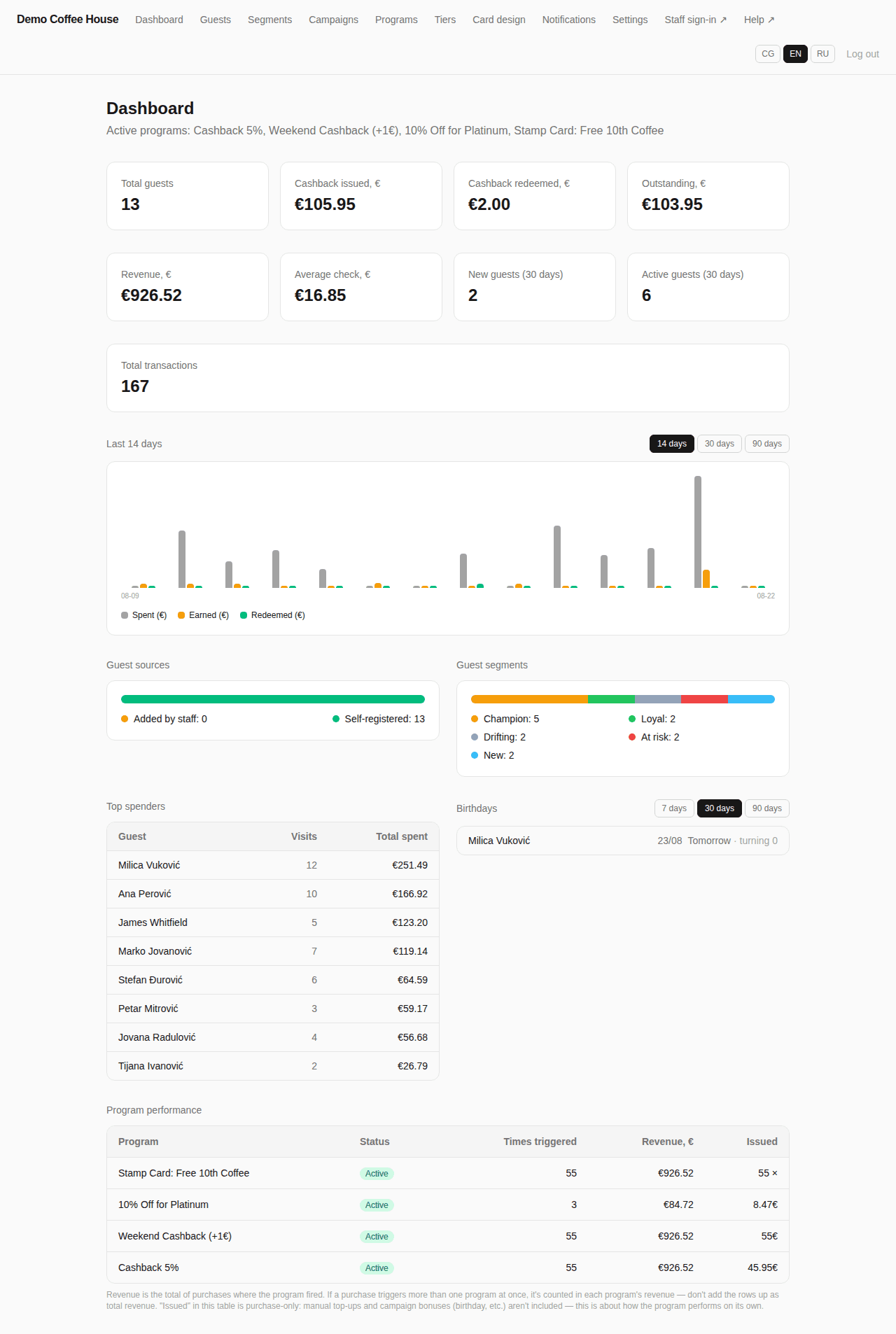
The guests page brings the whole database together with filters by segment, tier, and spend — handy for finding both regulars and guests who need a nudge to come back.
Learn more about guest management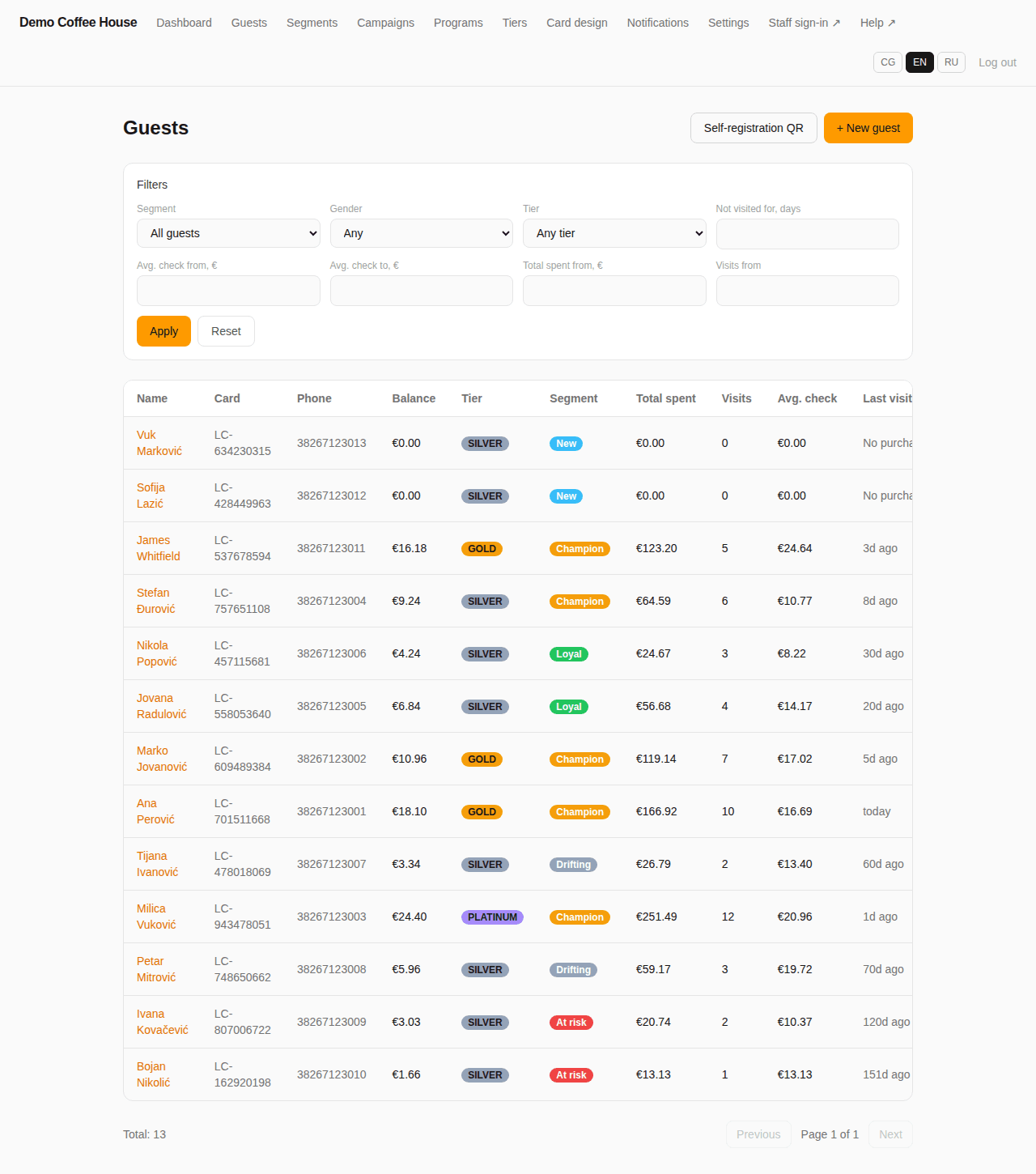
Tiers move up automatically based on a guest's lifetime spend — Silver, Gold, and Platinum show on the card and can unlock better program terms.
Learn more about tiers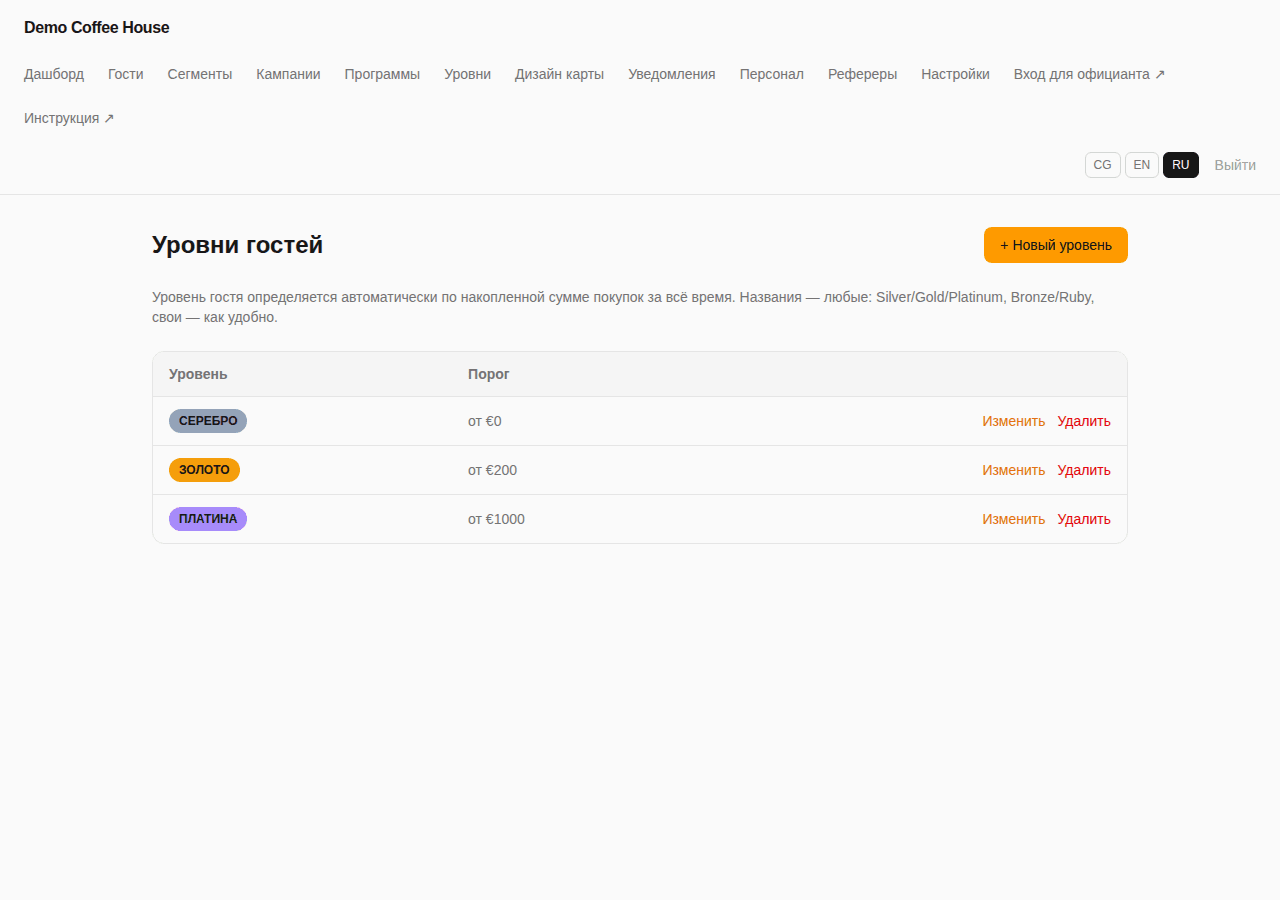
Practical workflow
From setup to the first bonus-earning payment
- 1
Set up programs and tiers
In the panel, turn on cashback, discounts, stamps, and tiers, and set thresholds and limits — once, for the whole restaurant.
- 2
The guest gets a card
At checkout or via a QR code on the table, the guest links a card to their phone in one tap.
- 3
The cashier charges and redeems bonuses
On every payment the cashier scans the card, and the matching programs apply automatically — no manual selection.
- 4
You track the results in the dashboard
Segments, tiers, and program performance update in real time, while automated campaigns bring back guests who stopped visiting.
Analytics and results
The dashboard shows not just how much cashback has been issued and redeemed, but which guests bring in the most revenue and which are at risk of leaving.
- Cashback issued, redeemed, and outstanding for any period
- Average check and total revenue from loyalty-card guests
- Real-time breakdown of guests by segment and tier
- A top-spenders table and upcoming birthdays
- Performance of each program: how often it triggered and how much revenue it generated
A referral program to bring in new guests
Beyond retaining current guests, Solvit Loyalty can track which new guests arrived through a blogger's, partner's, or staff member's link — counting real visits and revenue, not just clicks.
- A personal link and QR code for every referrer
- A guest who signs up through the link is permanently attributed to that referrer
- Separate stats on guest count, revenue, and average check per referrer
Frequently asked questions
Do guests need to install an app?+
No. The loyalty card is a web page behind a QR code that guests add to their phone's home screen in one tap — no separate app is needed.
Can a restaurant run several loyalty programs at once?+
Yes — on the Pro and Enterprise plans you can run percentage cashback, fixed-amount cashback, a discount, and a stamp card at the same time, each limited by day of week, time, or purchase amount.
How does the cashier apply bonuses at checkout?+
The cashier signs into the till module with a PIN, scans the guest's QR code with the camera or enters the card number manually, and taps Charge or Redeem — the matching programs apply automatically.
What happens when a guest stops visiting?+
The moment a guest moves from the Loyal segment to Drifting, they automatically get a push offering a reason to come back — no staff involvement needed.
Can a guest's tier be changed manually?+
Yes, a tier can be set manually for a VIP guest, and that change is logged separately in the tier history from automatic upgrades based on spend.
How do we get the guest list out for outside analysis?+
The guest list can be exported to Excel along with any filters applied, and re-imported later, for example after cleaning the data.
Do all guests receive push notifications?+
Only guests who opted in and installed the card to their phone's home screen — a guest who only registered but never installed the card won't receive pushes.
How do the plans differ for a restaurant?+
Basic includes a single loyalty program and a single tier with no push or referrers; Pro and Enterprise unlock all four program types, tiers, segments, automated campaigns, and the referral program.
Ready to bring guests back to your restaurant?
Request a demo and we'll show you how to set up loyalty programs for your restaurant in one call.