
For shops and retail stores
Cashback and bonuses on every purchase
Solvit Loyalty gives every shopper a digital card that rewards them at checkout — so a one-time visitor turns into someone who comes back for their next purchase.
- •Solvit Loyalty is a digital loyalty and CRM platform for local businesses, including retail shops and stores.
- •Customers use a QR-code digital card added to their phone's home screen — there is no native app to download.
- •Shops can run cashback, fixed cashback, percentage discount and stamp-card loyalty programs simultaneously.
- •Loyalty programs can be restricted by minimum purchase, day of week, time of day, or first-purchase-only.
- •The Enterprise plan supports multi-location retail chains under one account.
- •Referral marketing lets shops attribute new customers to a specific referrer's personal link and see per-referrer revenue.
Why walk-in shoppers don't come back
Most shoppers walk in once and you never see them again
Without a name, phone number or purchase history, there's no way to reach a first-time buyer after they leave — they simply have no reason to choose your shop over the next one.
Discount promotions attract bargain hunters, not loyal customers
A blanket seasonal discount moves stock, but it rewards anyone walking in that week equally — it doesn't build a habit of coming back, and it cuts into margin on customers who would have bought anyway.
You can't tell your best customers from one-time buyers
A shopper who buys every few weeks and a shopper who bought once during a sale look identical in a plain till report — there's no visit history or spend pattern to tell them apart.
A loyalty program built for how retail actually works
Set it up once — it runs at checkout automatically, with no extra step for staff.
Cashback or stamp cards that reward basket size
Run cashback as a percentage or a flat amount per qualifying purchase, or a stamp card that rewards frequency — restricted by minimum purchase, day of week, or first-purchase-only if you like.
Tiers that reward your best customers, not just repeat buyers
Set lifetime-spend thresholds (say, Silver from €0, Gold from €80, Platinum from €200) and let the system upgrade shoppers automatically, unlocking better rewards for the ones who spend the most.
Seasonal and time-restricted programs
Restrict any cashback or discount program by day of week, time of day, or minimum purchase — run a weekday-only bonus or a higher-spend cashback tier without touching your regular pricing.
Automatic birthday and win-back campaigns
A birthday bonus goes out on its own before the date, and the moment a regular customer's visits drop off, a win-back push goes out automatically — no manual list-building.
Typical scenarios
How shops use Solvit Loyalty day to day
Shopper checks out at the register
Staff scan the shopper's QR code (or type the card number in manually) and charge the sale — cashback or stamp progress updates instantly, with no separate loyalty terminal.
A regular hasn't shopped in two months
Their segment shifts from Loyal to Drifting automatically, and a reactivation push with a win-back offer goes out the same day, without anyone building a list.
A new customer arrives through a partner promotion
They sign up through a referrer's personal link — a blogger, local partner business, or staff member — and every purchase they make afterward is tracked back to that referrer.
Owner checks performance across store locations
On Enterprise, a chain with multiple shops sees performance broken down per location, alongside the same dashboard, segment and campaign tools used for a single store.
Relevant features
What matters most for a retail shop
Four program types, mixed as needed
Run cashback percentage, fixed cashback, a percentage discount and a stamp card at once — for example stamps for small frequent purchases and cashback for bigger baskets.
QR scan at checkout, no appointments needed
Works entirely on walk-in traffic — a customer's QR code is scanned at the till the same way for a first-time buyer or a regular, no booking or sign-up desk involved.
Guests page built for a real retail customer list
Filter and sort by segment, tier, days since last visit, average check range, total spent range and visit count — useful the moment your list grows past a handful of names.
Excel import and export
Bring an existing customer list in from Excel to start, and export the full list with balances and history back out any time for reporting or backup.
Push notifications for one-off promotions
Broadcast a one-time push to everyone who's opted in — useful for a seasonal sale or new stock announcement — with a delivery history showing reach and failure rate.
Multi-location support for retail chains
On the Enterprise plan, run loyalty across several shop locations under one account, with shared programs and per-location visibility.
See it in your admin panel
Real screens from a working Solvit Loyalty account
A shop's customer list looks exactly like this — filter by segment, tier, or days since last visit to see who needs attention.
See how the guest list works →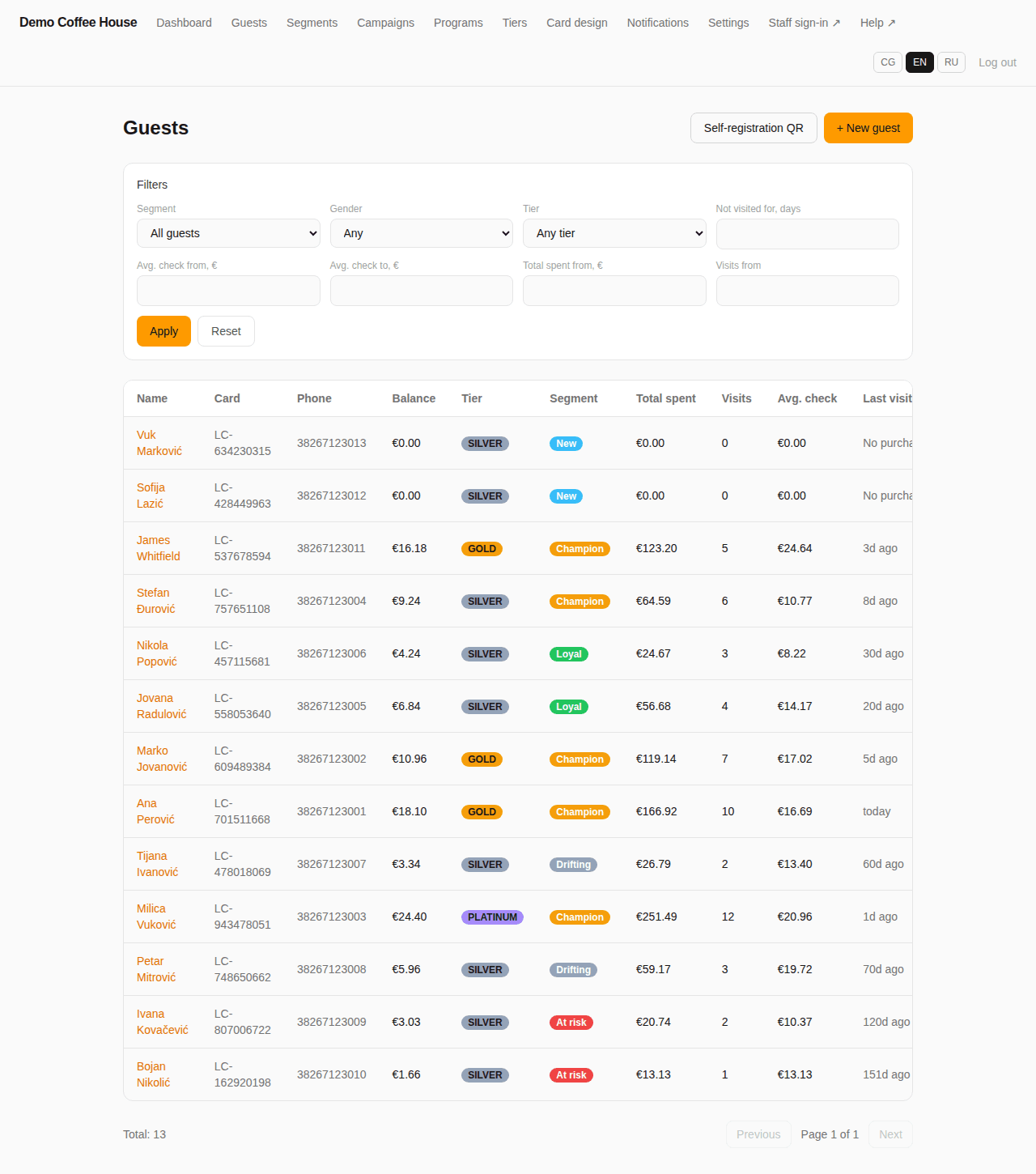
Four different loyalty programs can run side by side — mix stamps, cashback and discounts to fit different parts of your range.
See how programs work →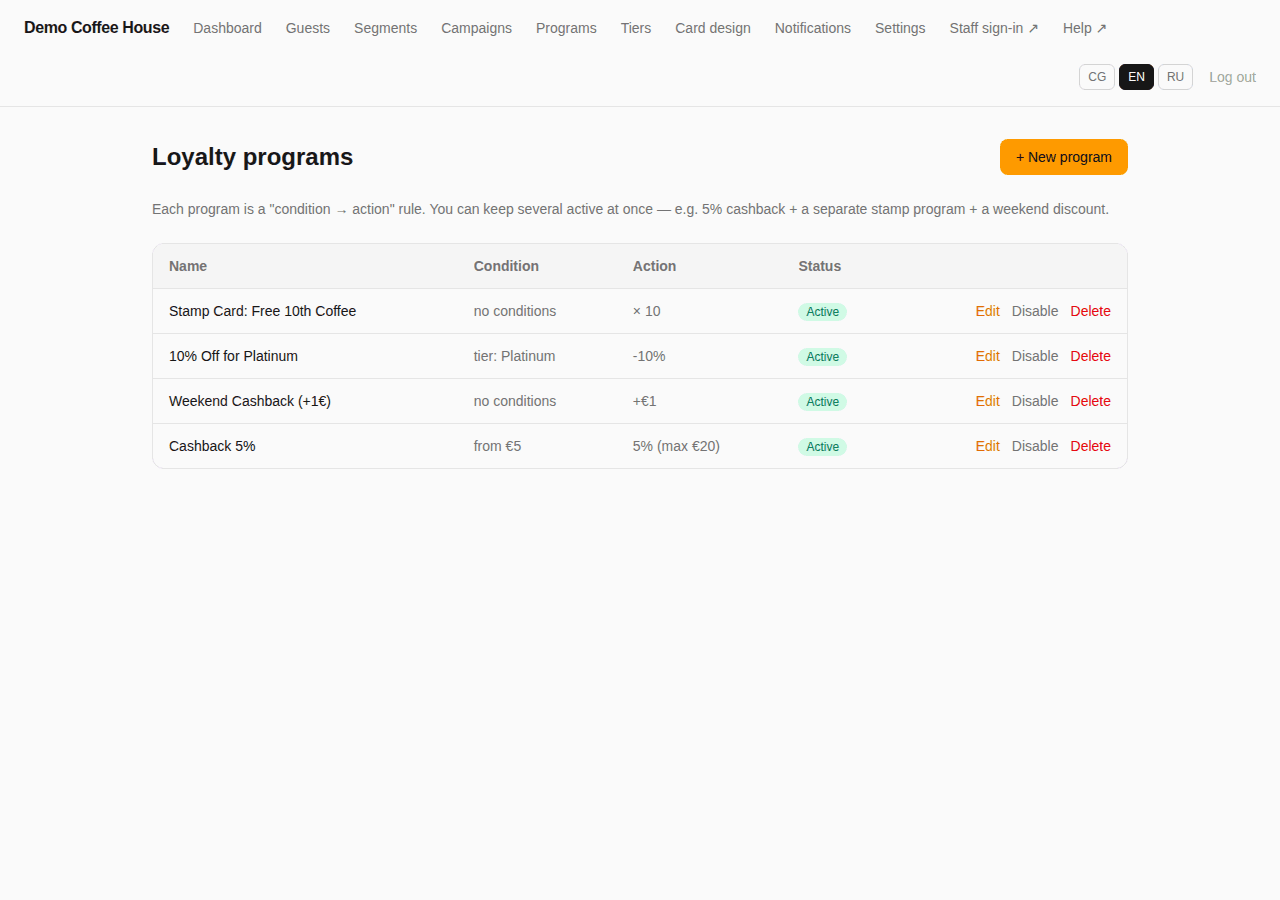
Announce a seasonal promotion or new stock to every opted-in customer with one broadcast.
See how push notifications work →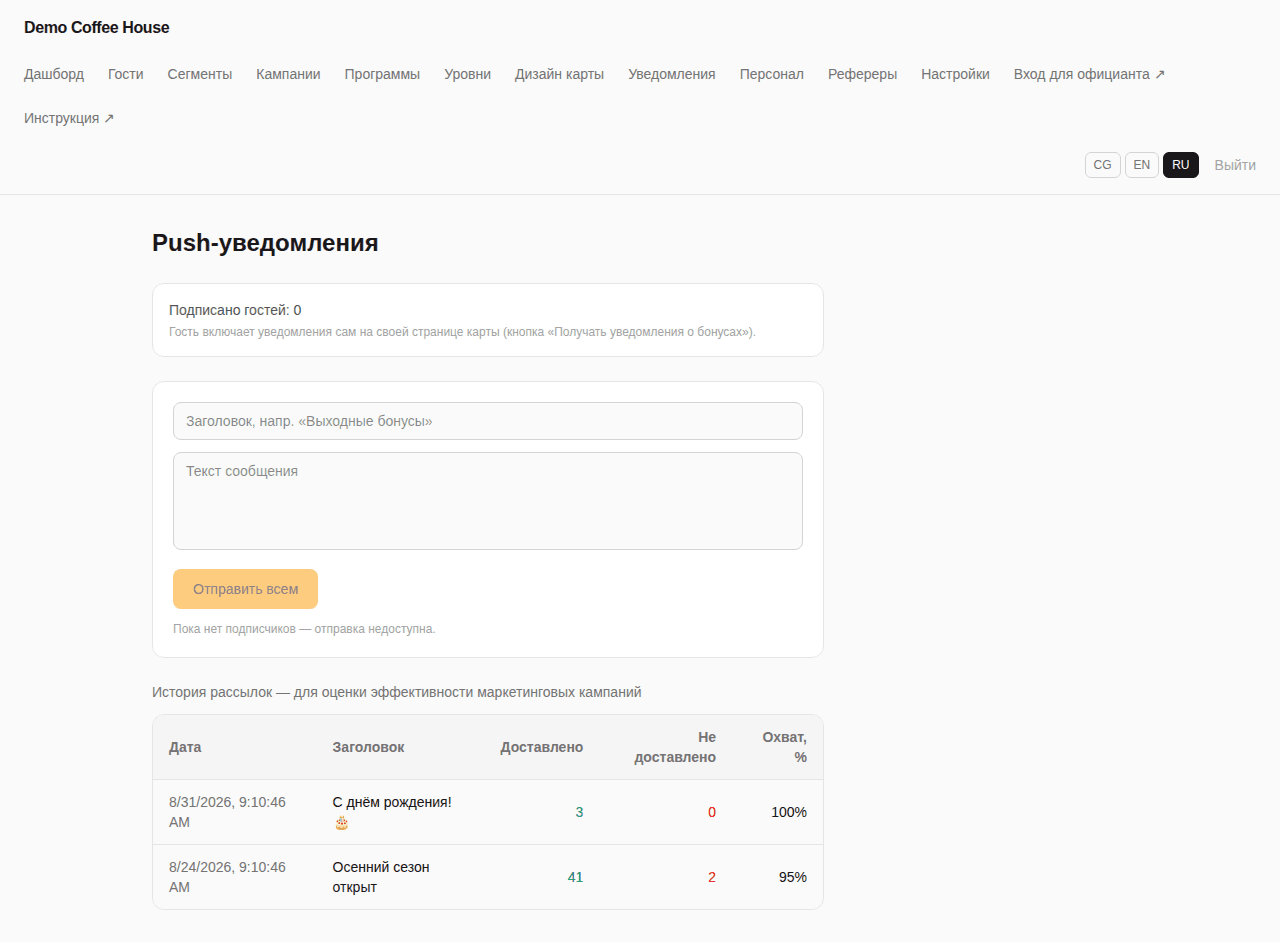
Practical workflow
From browsing to next visit
- 1
Shopper reaches the register
Staff pull up their card by scanning the QR code or entering the card number manually — works the same for a first purchase or a tenth.
- 2
Purchase is charged at the till
Any staff member signs in with a PIN and charges the sale. Every matching active program — cashback, discount or stamp — applies automatically.
- 3
Balance, stamps or tier update instantly
The customer sees their updated balance or stamp progress on their own card immediately after paying, with no separate app to check.
- 4
Customer comes back on their own
Birthday, reactivation and any seasonal push campaigns keep the shop on their radar between visits, without extra staff effort.
See which customers actually drive revenue
The dashboard turns register totals into numbers you can act on.
- Total customers, new vs returning, and a 14-day activity chart
- Cashback issued, redeemed and still outstanding
- Revenue, average basket size and total transactions
- Segment and tier breakdown across your full customer base
- Top-spending customers and upcoming birthdays at a glance
Turn partners and promoters into a growth channel
Give bloggers, local partner businesses or staff members their own personal referral link and QR code, and see exactly which customers and how much revenue each one brought in — not just how many people clicked.
- Each referrer gets a personal, permanent attribution link
- The Referrers page shows guest count, purchases, revenue and average check per referrer
- Available on Pro and Enterprise plans
Frequently asked questions
Does this work for walk-in retail without appointments?+
Yes — it's built entirely around walk-in traffic. A customer's QR code is scanned at the till at checkout, the same for a first-time buyer or a regular, with no booking step involved.
Should we use stamp cards or cashback for basket-size incentives?+
Stamp cards work well for frequent, similarly priced purchases — a coffee shop model applied to small retail items. Cashback, percentage or fixed, tends to fit shops with variable basket sizes, since the reward scales with what's actually spent. Many shops run both at once.
Can we import our existing customer list?+
Yes, an existing list can be imported from Excel to get started, and the full customer list with balances and history can be exported back to Excel at any time.
Do we need separate hardware to scan loyalty cards?+
No. Staff sign into the till module with a PIN and scan the customer's QR code with any camera-equipped device, or type the card number in manually — no dedicated scanner required.
How do you stop a discount program from just training customers to wait for sales?+
Discount and cashback programs can be restricted by minimum purchase, day of week, time of day, or limited to first purchases only, so a promotion can target new customers or slow periods without discounting every sale.
Do you support shops with multiple locations?+
Yes, on the Enterprise plan — a retail chain runs loyalty programs across several locations under one account, with dashboard and reporting visibility per location.
Can we track which promoter or partner brings in the most customers?+
Yes, through referrers. A blogger, partner business or staff member gets a personal referral link or QR code, and the Referrers page shows exactly how many customers and how much revenue they've brought in.
Do shoppers need to install an app?+
No native app. Customers add their digital card to their phone's home screen straight from the browser — a two-tap install on iPhone and Android.
Ready to see it running on a real retail account?
Book a short demo — we'll set it up with your products, tiers and pricing.